TUNE88
The Tuning App Built For Aural Tuners.
Play any interval. Read its beat speed in seconds. Tune the piano to a master's curve.
Everything the big-name tuning apps do: measure the piano, solve the stretch, raise the pitch, tune all 88 keys. Plus the one thing none of them will put a number on: the beat speeds an aural tuner works by. For a fifth of the price.
the App Store
Everything unlocked for 14 days. No account, no card, no subscription. If it does not earn its keep, keep the free version.
Then US$199, once. Founding price until 31 March 2027, then US$349.
“My
thought all along is that THIS is what a piano tuning app should have been from the
beginning.”
Jeff Deutschle
Everything a Professional ETD Does. And More.
Measure your piano's inharmonicity. Tune all 88 notes to a stretch curve solved for that instrument. The curve tunes a piano the way a master technician does, because it was reverse-engineered from their tunings.
iPhone and iPad, portrait or landscape. One purchase covers every device you own.
A Struck Note Is Never One Pitch.
Play a note and watch any tuner's number. It jumps as the hammer leaves the string, sags away through the decay, and settles somewhere else again as the note dies. The number is chasing all of that, which is why two readings of the same string disagree, and why the usual advice is to strike a few times and average it in your head.
LOCK ends the guessing. It grades the strike, takes the one part of the note worth measuring, and holds that value still until you play the note again. You set the pin against a number that is not moving. Strike again and it relatches, so the same string read twice gives you the same answer twice. That is the difference between setting the last half cent and estimating it.
Tap once for FAST and the live reading is back, for rough work and pitch raising where you want to watch the note move. Most tuning apps have no equivalent of either.
How Good Is Your Temperament?
If you tune by ear, you have most likely never actually known. You know it sounds right. You know the checks passed. But nobody has ever put a number on the thirds you just set and told you how evenly they really accelerate.
Set your bearing by ear the way you always do, then play it back through the app. Every third, sixth, fourth and fifth in beats per second, against what this piano's own physics says they should be.
You might find you are better than you thought. You might find one step that does not belong. Either way, you will know.
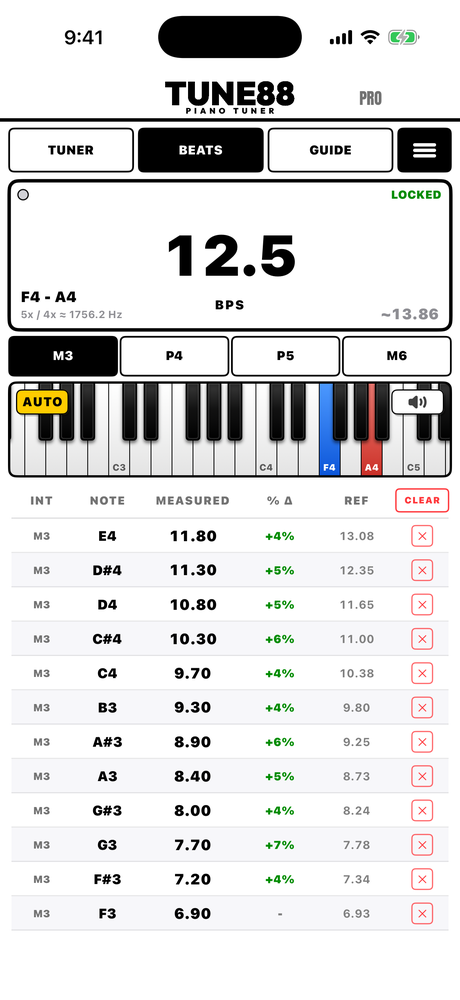
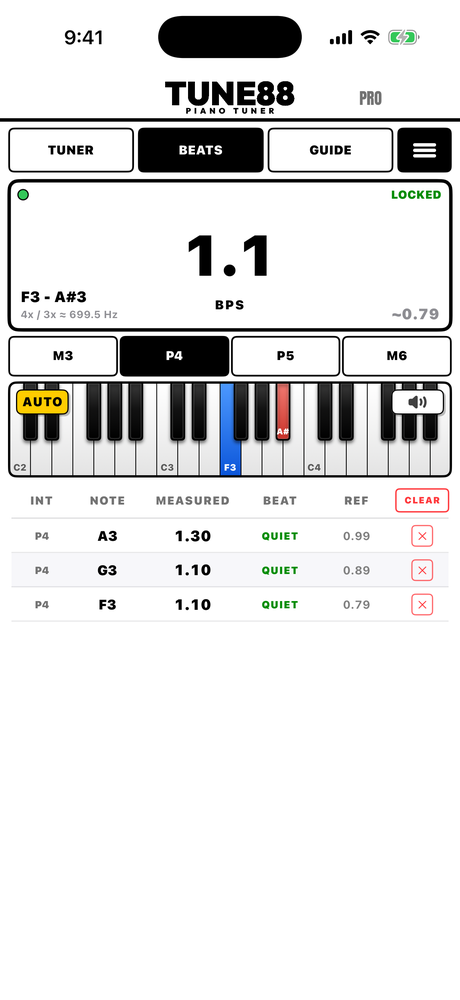
Play An Interval. Get A Reading.
The app works out which interval you played and measures its beat fast and repeatably, strike after strike, shown to a tenth of a beat per second.
Intervals the app measures: minor thirds, major thirds, fourths, fifths, sixths, tenths and seventeenths. The rapidly beating intervals a tuning is actually judged by, plus the fourths and fifths you keep quiet.
Whoever You Are, You Can Use It.
| If you are | You can use it to |
|---|---|
| Learning to tune | Tune to pitch with the app from day one, so the work still gets done. The guides, the theory and the ear school are there for when you want to learn the ear side, at whatever pace suits you. |
| An ETD tuner | Measure, solve, tune all 88 notes of your piano. The job your current app does, at a fraction of what most professional tuning apps cost. |
| An aural tuner | Use it for the stretch curve: measure the piano, get a master's curve solved for it, and tune to that by ear. Pitch raise fast with the app instead of raising by ear and then tuning by ear on top. Set the temperament in two minutes, or set it yourself and let the app check your beat speeds. |
Who it is not for: if all you ever want is a needle, the free version already does that on all 88 keys. Tune88 Pro is for the technician who wants the curve, the raise and the beats.
Our Stretch Curve.
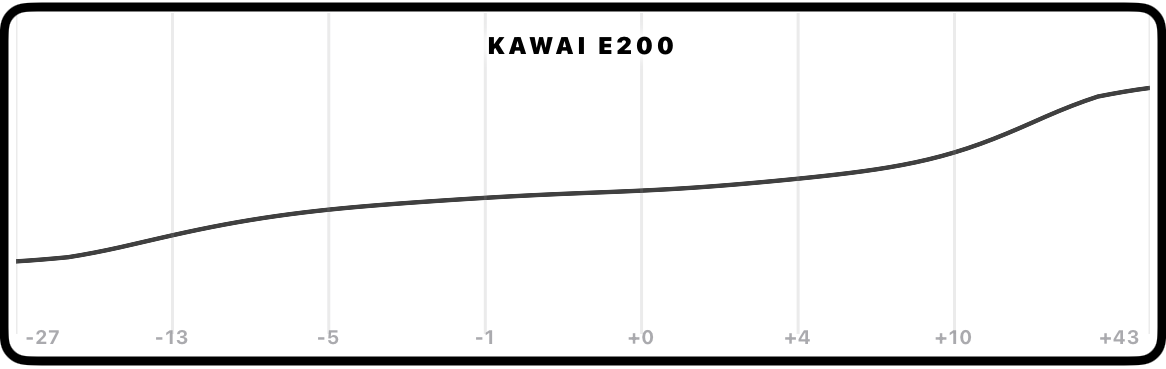
We found the best tuners we could. Reverse-engineered their tunings. Worked out the principles underneath, and how to reproduce them on any piano from its own inharmonicity.
It is not really our curve. It is the masters' formula, and underneath that it is physics: which intervals the ear actually hears as rough, how loud their partials are, and where on the keyboard music is played. A tuning is a compromise, and the aim is to spend it where it is least audible.
A master's curve, tailored to the piano in front of you.
The App Can Set A Perfect Temperament For You, Quicker Than You Can.
Set your temperament faster, and more accurately. For an aural tuner the bearing is the part that eats the clock, often taking multiple refinement passes. Set it once with the app, then carry on expanding by ear.
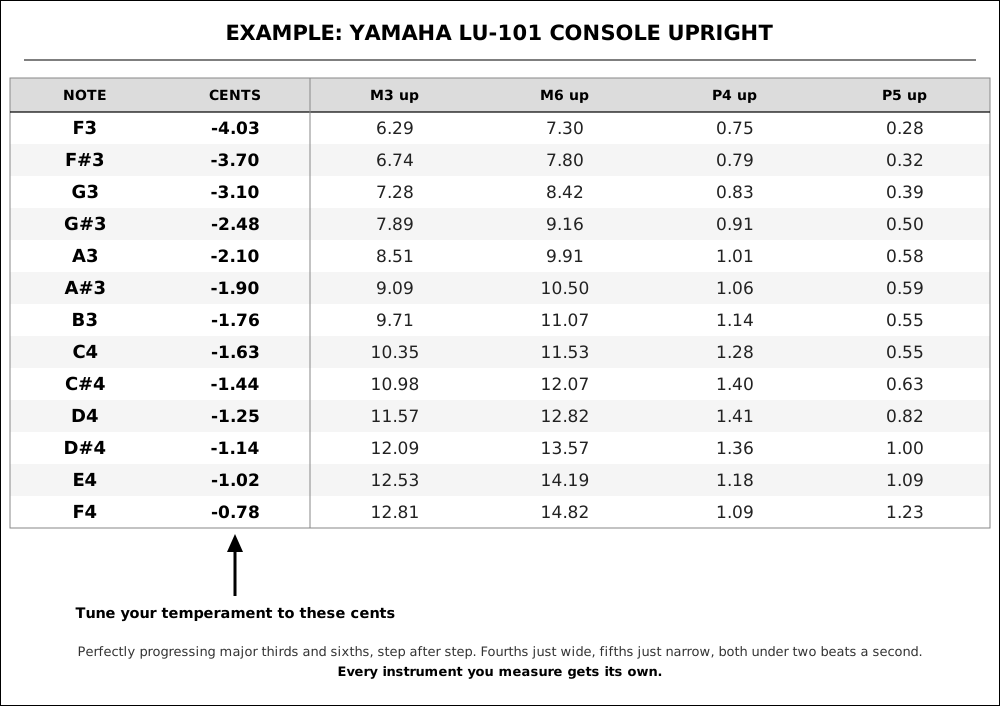
Your highest wound string and twelve notes measure the whole piano. Measure just six and you have a temperament-only curve in a couple of minutes.
Take this Yamaha LU-101, for example. Tune your temperament to the cents the app solved, and these are the beat speeds that fall out of it.
Through The Break.
At the highest wound string, inharmonicity does not ramp, it jumps. On our Yamaha LU-101 it nearly doubles in one semitone, from E3, the last copper string, to F3, the first plain wire. Measure only the notes either side and a curve draws a smooth ramp across that gap, which is wrong exactly where your thirds cross it.
So Tune88 has you tap that string and measures it on its own, before the twelve grid notes, then fits the wound and plain strings separately. The step lands where your piano actually has it. Solved on octaves alone, that step would put a 12% fall in the major thirds from E3 to F3. The app evens the thirds out across the break instead, moving the notes around it by under a cent and the temperament notes by a fifth of a cent at most, so your temperament stays even.
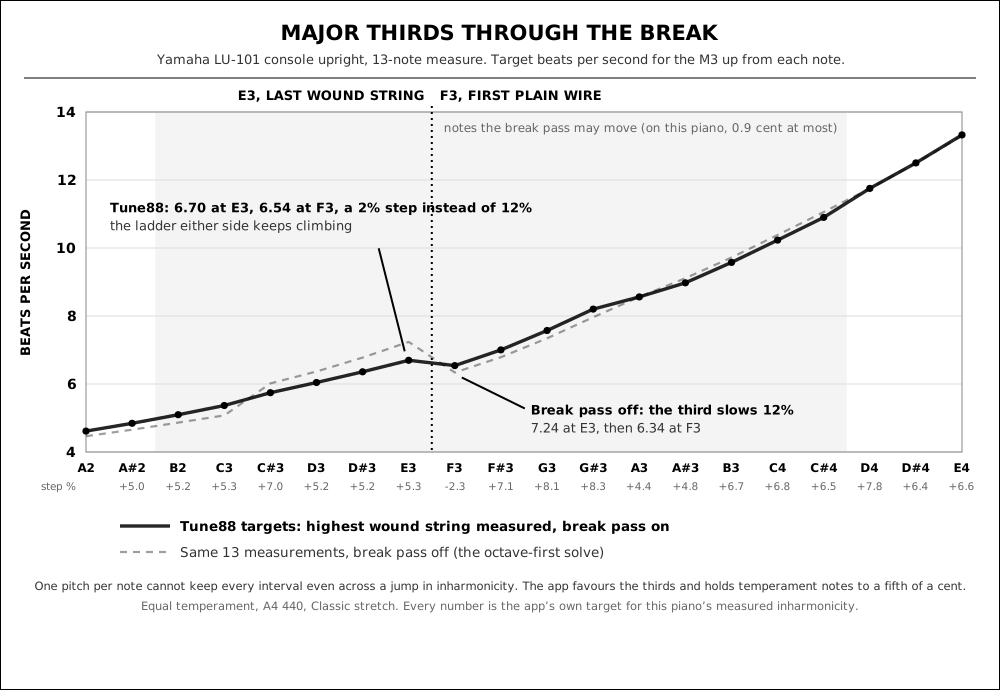
No single set of pitches can make every interval perfectly even across a jump like that: smooth the thirds and the tenths and fifths take the kink instead. We benched five other ways of spreading it on real pianos. None changed how much real music beats by more than a fraction of a percent, and each made some other interval worse. So the app favours the thirds, keeps the temperament clean, and leaves the last word to your ear. Play the thirds through the break and finish it by ear, as you always would.
the App Store
Everything unlocked, no card. Measure your own piano tonight. If it does not earn its keep, keep the free version.
Unmuted Pitch Raises.
Pitch raise without mutes. Strike the whole unison and every string shows as its own peak against the overpull line.
Overpull targets are calculated to textbook standards, and the app works out when a second pass is actually needed.
Guided Temperament Sequences.
For anyone learning to tune by ear. Using beat-speed detection, the app walks you through a temperament sequence from start to finish, reading every check live as you set it.
All the popular sequences are included: Defebaugh's F to F, Potter's bearing, Bremmer's Marpurg. What better way to learn?
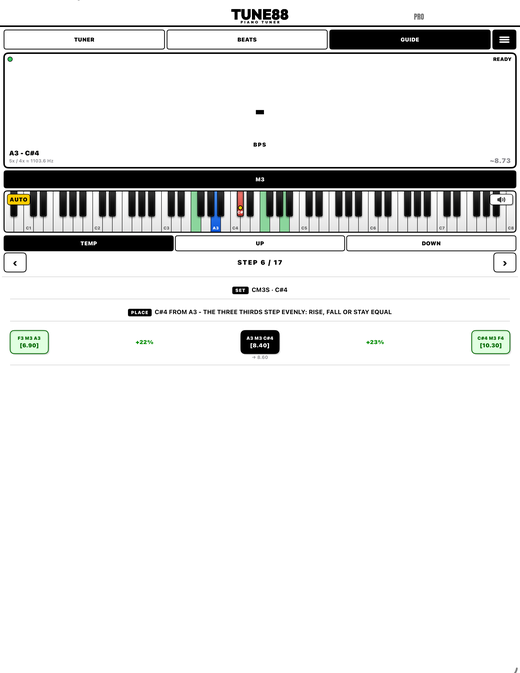
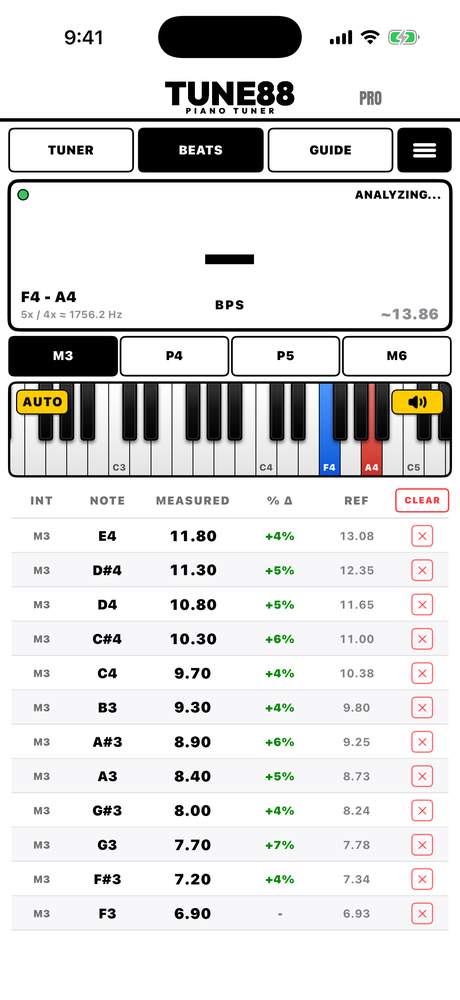
Struggling To Hear Beats? Listen To It Isolated.
See this switch on the roll?
 That is the LISTEN button. Put headphones on, turn it on, and play an interval.
The app auto-detects it, gives you the reading, and feeds the filtered audio
straight into your headphones.
That is the LISTEN button. Put headphones on, turn it on, and play an interval.
The app auto-detects it, gives you the reading, and feeds the filtered audio
straight into your headphones.
It is one of the fastest ways there is to train an ear. Once you know where the beat lives in the sound, you start finding it without the app.
Hear the difference. Real strikes from the bench Yamaha LU-101. Left, the strike as the room hears it. Right, the same strike through Tune88.
| Unfiltered | Through Tune88 | |
|---|---|---|
| Major third F3–A3 |
||
| Major sixth F3–D4 |
||
| Fourth F3–A#3 |
* Headphones recommended: through a speaker the mic hears its own output and the reading fights itself.
🎓 Ear Training School.
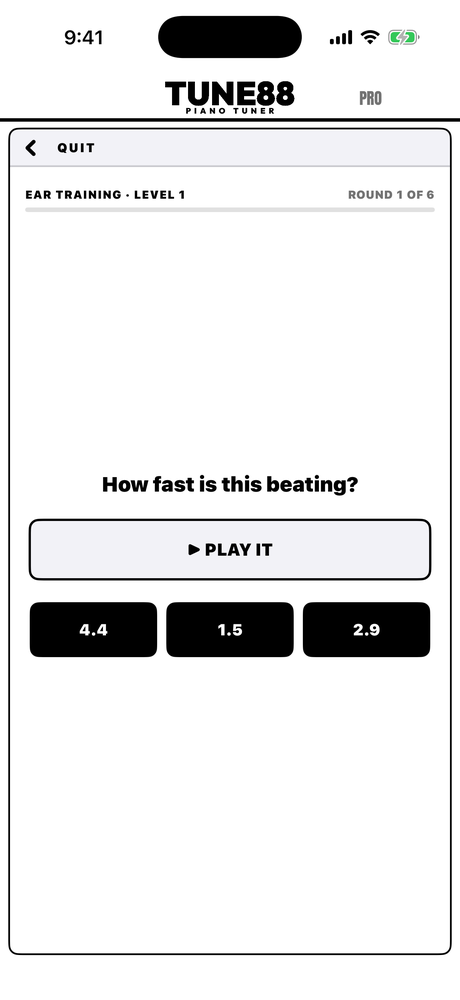
Understand tuning from first principles through eleven theory chapters. Practise a whole temperament in the simulator. Then sharpen the ear itself: 20 listening levels, 20 temperament-sim levels and 12 on your own piano.
Customised To Your Workflow.
The three modes across the top are TUNER, BEATS and GUIDE, and each one can be switched off. Want a plain electronic tuner and nothing else? Turn the other two off and the app becomes exactly that, one screen, no clutter. Only interested in beat speeds? Keep BEATS. Teaching an apprentice? Leave GUIDE on.
Same for the rest: choose which intervals appear, set A4 to anything, pick the temperament and stretch style, light or dark, strobe on or off, a log or linear meter. It is one app that four different technicians can set up four different ways.
What No App Can Do.
Unisons. Most notes on a piano have two or three strings, and they have to sit within a fraction of a cent of each other or the note beats against itself. That is done by ear and by hand, string by string, and no app sets it for you. ETD or aural, it is the same job either way, and it is most of what a listener actually hears.
Stability. A tuning is only as good as it is next month. Whether it holds comes down to how you set the pin: equalising the string either side of the bridge and the capo, settling the coil, leaving the wire at rest rather than under torsion. No number on a screen tells you that you have done it.
Both are mechanical, both are why skilled technicians exist, and neither is going away. This app makes the measurable part exact so your hands are free for the part that is not. The rest of the limits are written down here, before you buy rather than after.
FAQs.
How accurate is its curve?
Given only a piano's measured inharmonicity, its curve lands 1.6 cents RMS from what master tuners actually left on those pianos, F3 to C6. Another master's tuning copied onto the same piano misses by 1.9, plain equal temperament by 2.3. The curve was reverse-engineered from master tunings rather than assumed.
I tune entirely by ear. What would I use it for?
Speed and accuracy. Unmuted pitch raises onto an aural curve, with the app telling you when a second pass is needed. A temperament set perfectly in a fraction of the time it takes by hand. And your own bearing checked against numbers, properly, possibly for the first time. You still expand by ear.
How is it different from the other tuning apps?
It is the whole toolkit in one app. Strict inharmonicity measuring, because a curve is only as good as the reading under it, and the app refuses a bad strike rather than banking it. A curve reverse-engineered from master tunings. Live beat speeds. Guided sequences. A full theory and ear-training school. Unmuted pitch raises. A clean, fast interface with nothing in the way. And it costs a fraction of what the others do.
Will it work down in the bass and up in the top treble?
Pitch, yes, everywhere. Beat speeds read most reliably through the middle of the piano, which is where a tuning is decided. Out at the extremes a slow beat needs a good strike and a quiet room, and if the app cannot get a clean number it says so rather than inventing one.
Do I have to mute?
Not for a pitch raise. For beat speeds it works unmuted too, until the unisons themselves are out: then the unison's own beating is louder than the interval's, and a wedge fixes it in seconds.
What happens when the trial ends?
It drops to the free version: the tuner on all 88 keys on a generic curve (not one measured and tailored to your piano), major-third beat speeds through A3 to A4, and the Ear Training School – every theory page, all twenty ear-training levels and the temperament simulator as far as THE WINDOW. The rule is simple: if it does not need your piano, it is free. No saved tunings are deleted, though the measured ones stay locked until you buy.
What do I need?
An iPhone or iPad on iOS 17 or later. That's it, nothing else.
Uprights, grands, spinets?
All of them, and it has been tested on all of them. Split-scale spinets get their own treble-break step so a short bass is not modelled as a full scale.
Noisy rooms?
Noise reduction is always on. If the mic dot turns red the room is clipping the phone: move the phone into the piano.
Are my tunings backed up?
Every tuning is a file in your phone's Files app and rides along in its normal iCloud or computer backup. Nothing of yours is on our servers, because there are no servers.
Is there an Android version?
Not currently.
Can it teach me to tune by ear from scratch?
That is half the app: theory from first principles, an ear school from obvious to fine, guided sequences with the beats as evidence, and LISTEN to make the beats loud while you learn them.
Testimonials.
“Anyone wanting to really understand what's happening ‘under the hood’ should study and use this app. It should accelerate their learning process significantly.”
Peter Grey, RPT
“This is very brilliant… it works quite well (even with open unisons)! I'm very impressed.”
Jacob L
“[One of the huge benefits] is to see just how well we actually tune, compared to how we think we tune, either aurally or electronically.”
Jeff Deutschle
All three tested Tune88 before launch and were given early access free.
Everything In The Box. One Price.
The ETD
- Measure your piano in thirteen notes, six for a temperament
- A master's stretch curve solved for that piano
- All 88 keys, with LOCK for one settled reading per strike
- Unmuted pitch raise with calculated overpull and pass logic
- Historical temperaments and stretch styles, tuning reports
The aural side
- Live beat speeds on seven intervals, auto-detected
- Your bearing graded against this piano's own physics
- Guided sequences: Defebaugh, Potter, Bremmer and more
- LISTEN: the beating partial piped to your headphones
- Ear Training School: eleven chapters, 40 levels, a temperament simulator
All of it, on every device you own, for US$199 once. No module pricing, no yearly fee, every future update included.
Compared To Other Apps.
Each vendor's own published price.
Four rows on this table belong to Tune88 alone (shaded below): the live beat speed of any interval you play, and the tools built around it. Everything else here, the good apps all do.
| Tune88 | CyberTuner | pianoscope Pro | PianoMeter Pro | TuneLab | |
|---|---|---|---|---|---|
| Tunes the whole piano to a solved curve | ✓ | ✓ | ✓ | ✓ | ✓ |
| Measures your piano's inharmonicity | ✓ | ✓ | ✓ | ✓ | ✓ |
| Custom stretch styles and temperaments | ✓ | ✓ | ✓ | ✓ | ✓ |
| Pitch raise with calculated overpull | ✓ | ✓ | ✓ | ✓ | ✓ |
| Pitch raise without mutes | ✓ | – | – | ✓ | ✓ |
| One-string overpull for the fastest raises | ✓ | – | – | – | – |
| Freezes one graded reading per strike | ✓ | – | ✓ | – | – |
| Measures live beat speeds of any interval you play | ✓ | – | – | – | – |
| Guided step-by-step bearing sequences | ✓ | ✓ | – | – | – |
| Theory and ear-training school | ✓ | ✓ | ✓ | – | – |
| Hear the live strings' beating partials (LISTEN) | ✓ | – | – | – | – |
| Price | US$199 once | US$999.99 +US$84.99/yr | US$699.99 or US$169.99/yr | US$350 or US$59.99/yr | US$299.99 once |
US$199, once. A fifth of what the standard costs, and about what you charge for one tuning. That is the founding launch price, held until 31 March 2027. Then US$349, and US$499 from January 2028. Whatever you pay, you pay it once. Whatever you pay, you keep it and every update after it, forever. No subscription, ever.
✓ = documented by the vendor. – = not documented in the vendor's manual or store listing, checked September 2026, all in US dollars. CyberTuner is a one-time purchase plus a required US$84.99/yr subscription to keep its full 88-note mode; pianoscope and PianoMeter are each sold either one-time or by subscription (US$169.99/yr and US$59.99/yr); TuneLab is one-time only. Tune88 has no subscription of any kind. CyberTuner writes three predicted octave beat rates into the tuning record (A2-A3, A3-A4 and the double octave). TuneLab's manual never mentions beats at all, and pianoscope reports deviation curves rather than beat rates. None of them measures the live beat of an interval you play. By year five, CyberTuner has cost US$1,339. Tune88 has cost whatever you paid on day one.
Try it first
Free for 14 days
- Everything unlocked, once per Apple ID
- No account, no card, no strings
- After that it drops to the free version and stays yours: the tuner on all 88 keys on a standard curve, major-third beat speeds in A3–A4, and the Ear Training School
Keep it
US$199, once
- One purchase unlocks it for good
- No subscription. All future updates included.
the App Store
Price shown in your local currency on the App Store.
Competitor prices from their own published stores, August 2026.
A note from the builder. I am an apprentice aural piano technician and a programmer, not an ETD user by trade. That combination is why this app is shaped the way it is.
While I was learning I built a rough prototype out of necessity: it counted beat speeds, because nothing on the market would. It worked, and my ear training stopped being guesswork. That prototype became everything on this page. If something reads wrong on your piano, email me and I will fix it.
Daniel Vicary, danielvicary@outlook.com
Hear It On Your Piano.
Fourteen days of everything, free. The download takes a minute. The first measured tuning takes about two more. If it earns its keep, it is US$199, once. If it does not, keep the free version anyway.
the App Store
No account, no card, no subscription. Founding price US$199 until 31 March 2027. Privacy: everything runs on the phone. No accounts, no tracking, and your audio never leaves the device.
ALL FEATURES · TRY FREE / BUY · CONTACT / UPDATES · PRIVACY
Tune88 · Sydney, Australia · danielvicary@outlook.com
This site was made by a piano tuner, not a web designer. Last updated September 2026.